
LaTeX, a typesetting system known for its blend of visual appeal and practicality, remains the essential instrument for researchers and academics. However, while its capabilities are impressive, the learning curve is steep. As a researcher in AI, I find that I am very often using a set of LaTeX commands, macros and definitions when writing academic papers, and perhaps you will find them useful too.
Introduction
Whether you’re a seasoned LaTeX user or just beginning to explore its capabilities, this compilation is aimed to make your academic papers seem just a little bit more polished than your competition. I am not promising that it will increase your chances of acceptance, that we will explore in another post.
In an earlier post we had a
look at ten LaTeX packages, but in this post we will look at commands and
macros. If you are starting a new project from scratch, Bootstrapping your next
LaTeX project
covers project structure and build automation. So, without further ado, and in
no particular order, here are 10 18 useful LaTeX commands, macros and other
tips for your writing pleasure.
Commands, macros and other tips
Math modes
When writing math in a paper, you can use the LaTeX syntax \( x = 1 \) (or \[
for inline math mode (Wright, 2022). This will sometimes provide
better error messages, and having a begin and end point is nice if you ever
would like to parse the document with a script. The TeX
syntax $ x = 1 $ works as well, and some will say that this is more readable.
Read about other subtle differences at Are \ ( and \ ) preferable to dollar signs
for math
mode?
It is common that LaTeX introduces a line break inside the equation, which might
not look great for inline math. You can use curly brackets to avoid the line
breaking, for example \({ x = 1 }\).
Dynamic delimiters
Dynamic delimiters in LaTeX are great because they automatically adjust their size to match the content they enclose, increasing readability of mathematical expressions.
You can manually vary the size of delimiters such as parentheses with \big(, \Big(,
\bigg( and \Bigg(.
However, almost always I use dynamically sized delimiters.
1
\left( \sqrt{a}+\sqrt{b}\right )^2
which produces
\[\left( \sqrt{a}+\sqrt{b} \right)^2\]as opposed to
\[( \sqrt{a}+\sqrt{b} )^2\]without using \left( and \right).
I recently learned we can do even better by declaring paired delimiters (Zeng, 2023)! By using the mathtools (Madsen et al., 2022) package we can define a paired braces with
1
\DeclarePairedDelimiter\braces{\lbrace}{\rbrace}
Then we can use the command \braces*{ ...} (note the starred version here) (Zeng, 2023).
Read more about brackets, parantheses and scaling the middle vertical line in Brackets and Parentheses and
How to automatically scale \mid within delimiters. Read more about declaring paired delimiters at Automatic left and right commands.
Numbers and units
siunitx (Wright, 2026) is a powerful tool for typesetting and formatting scientific and technical documents. It specializes in handling units, quantities, and numerical values, ensuring proper spacing, alignment, and consistent appearance.
1
2
3
4
5
6
7
8
9
10
\usepackage{siunitx}

% SI unit setup
\sisetup{
    exponent-product=\cdot
}

\DeclareSIUnit{\belmilliwatt}{Bm}
\DeclareSIUnit{\dBm}{\deci\belmilliwatt}
\DeclareSIUnit\px{px}
This allows us to add a number and unit with \qty{52}{\ampere\meter}. A number can be typeset with \num{1e5}. We can even typeset ranges with \qtyrange{1}{99}{\px} or \numrange{1}{99}. In an earlier post, we looked at using Pandas (pandas development team, 2020; Wes McKinney, 2010 ) to produce nice looking tables with no manual steps, and here we also used the table format S from siunitx.
Spaces and domains
Here are a few definitions of domains that I use.
1
2
3
4
5
\newcommand{\Z}{\mathbb{Z}} % Integer numbers
\newcommand{\R}{\mathbb{R}} % Real numbers
\newcommand{\N}{\mathbb{N}} % Natural numbers or prime numbers
\newcommand{\C}{\mathbb{C}} % Complex numbers
\newcommand{\Np}{\mathbb{N}^+} % Natural numbers including 0
For example \mathbb{N}^+ = \mathbb{N} \setminus \{0\} \(\mathbb{N}^+ = \mathbb{N} \setminus \{0\}\). To denote the empty set, I prefer $\varnothing \(\varnothing\) over \emptyset \(\emptyset\). For this, and many many more notations, see (Siek, n.d.).
Bachmann-Landau notations
Bachmann-Landau notation, a fundamental concept in theoretical computer science and mathematics, offers a concise and standardized way to describe the growth rates of functions and their relationships in mathematical analysis. Named after the mathematicians Paul Bachmann and Edmund Landau (Wikipedia contributors, 2023), this notation employs symbols like \(\mathcal{O}\), \(\Omega\), \(\Theta\), \(o\), \(\omega\) and \(\) to articulate upper, lower, and tight bounds, on the behavior of functions as their inputs become sufficiently large.
Put this in your document preamble.
1
2
\usepackage{amssymb}
\newcommand{\BigO}[1]{\mathcal{O}\!\left(#1\right)}
Then we can use the command \BigO{} like this:
1
\BigO{n\log{}n}
This will produce \(\mathcal{O}\!\left(n \log{n}\right)\). Here is a Complete list of Bachmann-Landau notations. The \! adjusts the spacing to be more pleasing (Thanks u/Tensor_Product_9377!).
Defining new math operators
Operators such as \(\sin\) and \(\cos\) are typeset in a roman font in math mode (Higham, n.d.)
. If you need to define a new operator, you can use amsmath to make sure spacing is consistent with the already defined operators.
1
2
3
4
5
6
7
8
9
10
11
\usepackage{amsmath}
\DeclareMathOperator{\tr}{tr}
\DeclareMathOperator*{\Max}{Max}
\DeclareMathOperator{\Prob}{\mathcal{P}}
\DeclareMathOperator{\sgn}{sgn}
\DeclareMathOperator{\DFT}{DFT}

\begin{displaymath}
  \Max_{x\in A} f(x) \qquad  \End_R V
\end{displaymath}
\def\diag{\mathop{\mathrm{diag}}}
See newcommand vs. DeclareMathOperator and Defining a new log-like function in LaTeX for more information.
Typesetting a definition
Sometimes I see the notation := to denote a definition, and I don’t
particularly care for it since it reminds me of the Walrus operator introduced
in Python 3.8 (Hettinger, 2019). Even though the Walrus operator is an assignment operator, it
looks as code, not mathematics. I much prefer the overset triangle \triangleq
\(\triangleq\) from amssymb.
If you’d rather use an overset text def, here is how to do that.
1
\newcommand\myeq{\mathrel{\overset{\makebox[0pt]{\mbox{\normalfont\tiny\sffamily def}}}{=}}}


amssymbSee Triangle on top of propto that matches \triangleq, Notation for definition and equivalence, How do I put text over symbols? and Delta-equal to symbol for more information on the topic.
Vectors and matrices
When I studied physics, my preferred way of writing vectors was using \vec{x}
\(\vec{x}\). I used to prefer bold symbols for vectors and matrices using
the bm package \bm{x} \(\bm{x}\).
See bm package versus \boldsymbol for more information.
However, under unicode-math the recommended bold commands are
\symbf (bold upright) and \symbfit (bold italic).
\mathbf still works for backward compatibility and is aliased to
\symbf — bold upright. The bm package is no longer
needed and is incompatible with unicode-math’s symbol slots.
Transpose symbol
Here is a controversial topic on which transpose sign to use. I prefer \intercal over T any day of the week, but I agree with the user @Heiko Oberdiek that it is typeset a little too low for capital symbols (such as matrices). For lowercase symbols, just using \intercal looks better to me. See the full discussion on What is the best symbol for vector/matrix transpose?.
1
2
3
4
\makeatletter
\newcommand*{\transpose}{{\mathpalette\@transpose{}}}
\newcommand*{\@transpose}[2]{\raisebox{\depth}{$\m@th#1\intercal$}}
\makeatother

I would like to have one macro for both lowercase and for uppercase symbols alike.
Overbrackets and underbrackets
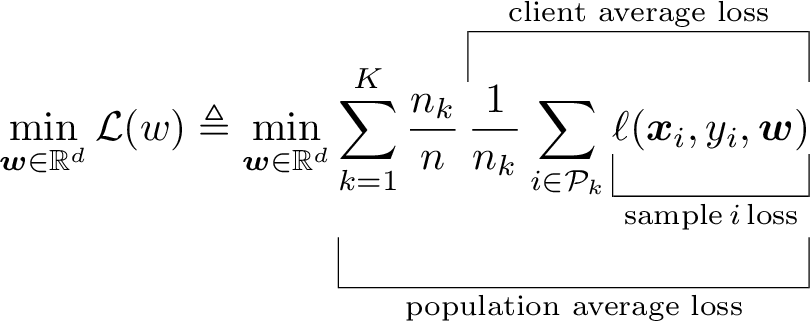
Brackets, and braces, provide an excellent way of highlighting a part of an equation to be able to explain in better.
1
2
3
\begin{equation}
    \min_{\bm{w} \in \mathbb{R}^d} \mathcal{L}(w) \triangleq \min_{\bm{w} \in \mathbb{R}^d} \underbracket[.25pt][12pt]{\sum_{k=1}^K \frac{n_k}{n} \overbracket[.25pt][12pt]{\frac{1}{n_k} \sum_{i \in \mathcal{P}_k}  \underbracket[.25pt][10pt]{\ell(\bm{x}_i, y_i, \bm{w})}_{\text{sample}\,i\,\text{loss}}}^{\text{client average loss}}}_{\text{population average loss}}
\end{equation}
Inline TikZ
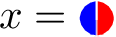
Sometimes it is easier to explain something with a small figure instead of
creating some notation that is difficult to understand. I like to use this in a
figure caption for example. We can use the tikz package (Feuersänger et al., 2014)
for this.
1
2
3
4
5
6
7
8
9
10
\documentclass[varwidth=true, border=0pt, convert={outext=.png}]{standalone}
\usepackage{tikz}
\usepackage{xcolor}
\newcommand{\sharedkey}{
    \raisebox{-.5 ex}{\tikz{
    \draw[fill=blue, draw=white] (0ex,0) arc(90:270:1ex) -- cycle;
    \draw[fill=red, draw=white] (0ex,0) arc(90:-90:1ex) -- cycle; }}}
\begin{document}
\(x = \sharedkey\)
\end{document}
See Tikz picture inline for some other examples. For complete figure workflows in academic papers — including pgfplots and Matplotlib exports — see Create publication ready figures with Matplotlib and TikZ.
Figure up top
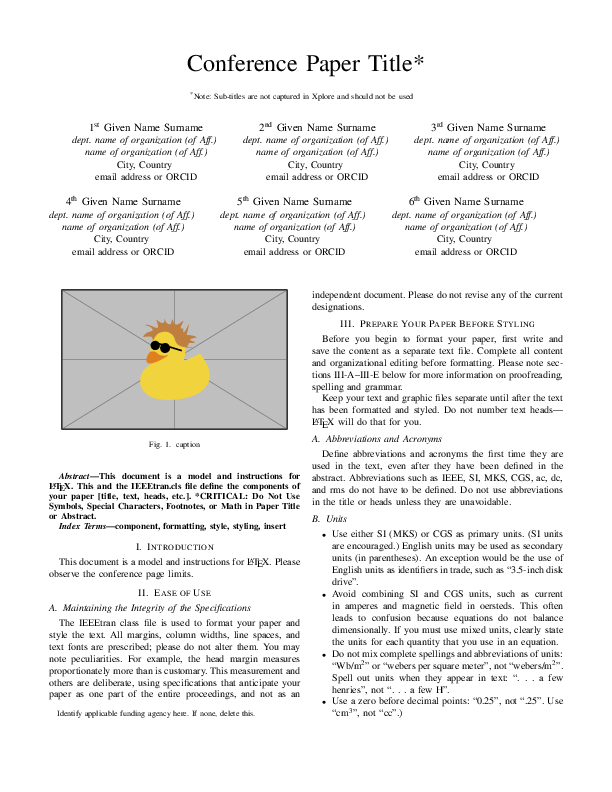
It is advantageous to put a nice overview figure in the top right corner (Huang, 2018), but it can be a bit fiddly to do so. From StackExchange: Start placing figures on right-hand side column of first page we learn a trick that makes it easier!
1
2
3
4
5
6
7
8
9
10
11
12
13
14
15
16
17
18
19
20
21
22
23
24
25
\documentclass{IEEEtran}
\usepackage{lipsum}

\title{My IEEE article}
\author{Author}

\begin{document}
\maketitle
\global\csname @topnum\endcsname 0
\global\csname @botnum\endcsname 0
\begin{abstract} \lipsum[1]\end{abstract}

\section{First Section}

As you can see in Fig~\ref{fig}

\begin{figure}
\centering
\fbox{A nice figure}
\caption{A nice figure}\label{fig}
\end{figure}

\lipsum[1-5]

\end{document}
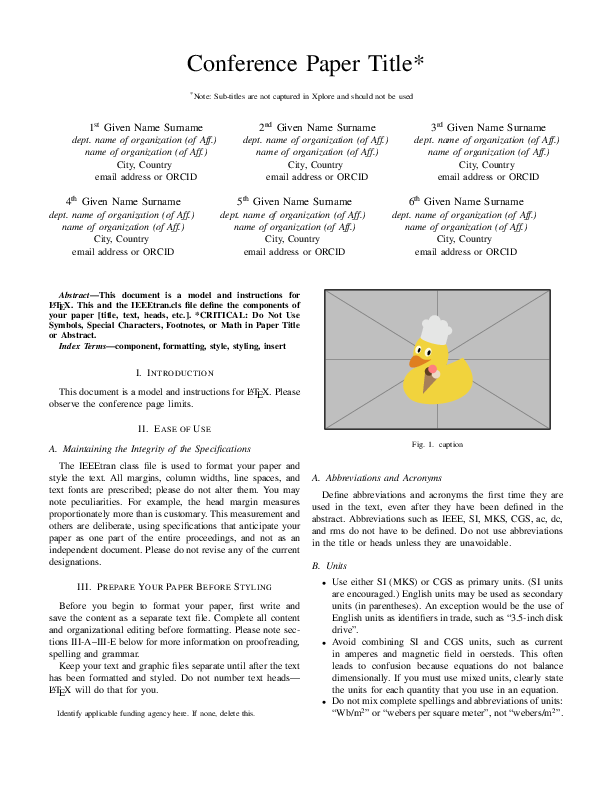
IEEE references
When writing papers using the IEEE conference template (Shell, 2002) and BibTeX, you can use some
interesting trickery to automatically control when et al. will be written out (Shell, 2007) instead of editing the .bib-file. From the IEEE conference template we have that unless there are six authors or more we should print out the names of all the authors.
In the document itself, in the preamble, you need to add
1
\bstctlcite{IEEEexample:BSTcontrol}
At the top of your .bib-file you put this.
1
2
3
4
5
@IEEEtranBSTCTL{IEEEexample:BSTcontrol,
  CTLuse_forced_etal       = "yes",
  CTLmax_names_forced_etal = "6",
  CTLnames_show_etal       = "1"
}
- Setting
CTLuse_forced_etaltoyestruncates the list of author names and forces the use of “et al.” if the number of authors in an entry exceeds a set limit. CTLmax_names_forced_etalis the value of the maximum number of names that can be present beyond which “et al.” usage is forced. From the IEEE conference template we get that this shall be 6.- When et al. is forced,
CTLnames_show_etalcontrols the number of names that are shown.
See (Shell, 2007) for complete list of parameters and default values.
Citations without line breaks
Citations and references is something that LaTeX and BibTeX do really well. A common way of citing is by writing word~\cite{source} so that there is a non-breaking space between the word and the brackets (assuming IEEE style here). However, when you cite multiple sources, the result is [7]–[9] or [10, 11] which could potentially introduce a line break within the citation itself! To fix this, we need to redefine the \citepunct and \citedash macros that determine what is inserted between the citations. In the first case, we just use a common non-breaking space ~, and in the second the \nolinebreak command prevents line breaking, and \hspace{0pt} allows the following text to start immediately, without inserting any additional space.
1
2
\renewcommand{\citepunct}{,~}
\renewcommand{\citedash}{]--\nolinebreak\hspace{0pt}[}
Typesetting et al.
I like to use a macro to write et al. where we add a penalty to a line break between the two parts.
1
\def\etal.{et\penalty50\ al.} % et al. with correct spacing
See Should “et al.” have a thin or full, non-breaking vs. breaking space?.
Epsilon
In academic writing, particularly in mathematics, subtle nuances of notation can play a crucial role in conveying precise meanings. Sometimes using another symbol is just a sign of the author’s experience in the field. This holds true for symbols like “epsilon,” often denoted as either \(\epsilon\) (lunate form) or \(\varepsilon\) (inverted-3 form).
The choice between these two symbols illustrates a point that which symbol to use where might be a matter of discussion and source of confusion. See (Wikipedia contributors, 2023) and \varepsilon vs. \epsilon for more information on the two versions.
Imaginary i
The possible ways of typesetting an imaginary \(\mathrm{i}\) are discussed in How should imaginary numbers be typeset?.
I like to use an upright \(\mathrm{i}\), as in (ISO, 2009). Adding a small kern to distance it from an exponent, we can define it as
1
\newcommand{\di}{\mathrm{i}\mkern1mu} % imaginary i in roman and with correct spacing
Bonus tip
Not a LaTeX command, package or macro, but an extremely useful tool - Detexify is a web-based tool designed to help users find the LaTeX command for a specific symbol by drawing it. There is also a Mac OS application!
Related work
There are a few other sites with similar lists, and here are some of my favorites.
- The Art of LaTeX: Common Mistakes, and Advice for Typesetting Beautiful, Delightful Proofs (Zeng, 2023)
- Use Custom LaTeX Macros to Boost Your Writing Productivity (Valero, 2021)
- How to annoy your co-authors: a GitLab CI pipeline for LaTeX — automate compilation, linting, and diff generation on every commit
Conclusion
TeX and LaTeX are about as old as I am, and there are no shortage of packages and templates that you can use to craft elegant mathematical documents. There is also no shortage of “top ten” lists showcasing them. In this post we explored a few of my favorite commands and macros, please comment below with your favorites! For anyone wishing to dig deeper into mathematical typesetting, I would recommend (Knuth et al., 1989).
AI disclosure
This post was reviewed with AI-assisted quality tools (Claude Sonnet 4.6) to identify issues. All text is my own.
References
- Wright, J. (2022). Some TeX Developments — Math mode. https://www.texdev.net/2022/09/13/math-mode—vs-%5C(-%5C)
- Zeng, F. P. (2023). The Art of LaTeX: Common Mistakes, and Advice for Typesetting Beautiful, Delightful Proofs. https://fanpu.io/blog/2023/latex-tips/
- Madsen, L., Høgholm, M., & The LATEX Project Team. (2022). mathtools – Mathematical tools to use with amsmath. System, 1–38. https://ctan.org/pkg/mathtools
- Wright, J. (2026). siunitx — A comprehensive (SI) units package (Version 3.5.5). https://www.ctan.org/pkg/siunitx.
- pandas development team, T. (2020). pandas-dev/pandas: Pandas (Version latest) [Software]. Zenodo. https://doi.org/10.5281/zenodo.3509134
- Wes McKinney. ( 2010 ). Data Structures for Statistical Computing in Python . In Stéfan van der Walt & Jarrod Millman (Eds.), Proceedings of the 9th Python in Science Conference (pp. 56–61 ). https://doi.org/ 10.25080/Majora-92bf1922-00a
- Siek, K. LaTeX Formal Methods Reference. Retrieved August 10, 2023, from http://www.cs.put.poznan.pl/ksiek/latexmath.html
- Wikipedia contributors. (2023). Big O notation — Wikipedia, The Free Encyclopedia. https://en.wikipedia.org/w/index.php?title=Big_O_notation&oldid=1168125072
- Higham, N. Top Tips for New LaTeX Users. Retrieved August 11, 2023, from https://nhigham.com/2015/09/29/top-tips-for-new-latex-users/
- Hettinger, R. (2019). What’s New In Python 3.8. https://docs.python.org/3/whatsnew/3.8.html
- Feuersänger, C., Menke, H., & Tantau, T. (2014). TikZ & PGF manual. https://www.ctan.org/pkg/pgf
- Huang, J.-B. (2018). Deep Paper Gestalt. CoRR, abs/1812.0. http://arxiv.org/abs/1812.08775
- Shell, M. (2002). How to use the IEEEtran LATEX class. Journal of LaTeX Class Files, 12.
- Shell, M. (2007). How to Use the IEEEtran BIBTEX Style. Journal of LaTeX Class Files, 12(4), 100–120.
- Wikipedia contributors. (2023). Epsilon — Wikipedia, The Free Encyclopedia. https://en.wikipedia.org/w/index.php?title=Epsilon&oldid=1168559821
- ISO. (2009). ISO 80000-2: Quantities and units — Part 2: Mathematical signs and symbols to be used in the natural sciences and technology (p. 40). pub-iso. https://www.iso.org/standard/31887.html
- Valero, C. S. (2021). Use Custom LaTeX Macros to Boost Your Writing Productivity. https://www.cesarsotovalero.net/blog/use-custom-latex-macros-to-boost-your-writing-productivity.html
- Knuth, D. E., Larrabee, T., & Roberts, P. M. (1989). Mathematical Writing (Vol. 14). Mathematical Association of America. https://jmlr.csail.mit.edu/reviewing-papers/knuth_mathematical_writing.pdf
Suggested citation
If you would like to cite this work, here is a suggested citation in BibTeX format.
@misc{isaksson_2023,
  author="Isaksson, Martin",
  title={{Martin's blog --- Top LaTeX commands and macros for academic writing}},
  year=2023,
  url=https://blog.martisak.se/top-latex-commands/,
  note = "[Online; accessed 2026-07-12]"
}